

Why Most Business Software Fails Before It Scales
Most software failures are not caused by technology. They happen because businesses build tools around immediate needs instead of long term operational systems. As teams grow, shortcuts become bottlenecks, workflows become fragmented, and software that once solved problems starts creating new ones.

 By Lokomax Studio
Businesses often assume software problems can be solved by adding more tools. When reporting becomes difficult, they buy analytics software. When communication breaks down, they add another collaboration platform. When customer management becomes complicated, they introduce a new CRM.
For a while, these decisions appear to work.
Then growth arrives.
Teams expand, workflows become more complex, customer data spreads across multiple systems, and employees spend increasing amounts of time moving information between platforms instead of creating value.
The issue is rarely the software itself. The problem is that many businesses build collections of tools rather than operational systems. What solves a problem for ten employees can become a major bottleneck for one hundred.
Scalable software is not simply software that handles more users. It is software designed around how the business operates, evolves, and makes decisions over time.
What This Insight Covers
Growth Exposes Weaknesses
Software limitations often appear only after teams and processes expand.
Workflow First Thinking
Systems should support operational behavior before adding features.
Visibility Matters
Teams perform better when information is centralized and accessible.
Scalability Is Planned
Sustainable growth requires architecture designed for future complexity.
Where Most Software Projects Break Down
Many software projects begin with good intentions. A company identifies a problem, hires a developer, purchases a platform, or introduces a new tool to improve efficiency.
The challenge is that these decisions are often made in isolation.
Instead of examining how departments interact, how data flows through the organization, or how future growth will affect operations, businesses focus only on solving the immediate issue in front of them.
This creates disconnected systems.
Customer information exists in one platform. Reporting data lives somewhere else. Internal approvals happen through emails and spreadsheets. Employees spend significant time manually transferring information between systems.
As complexity increases, productivity decreases.
The software itself may function perfectly. However, the business becomes dependent on inefficient processes that were never designed to scale.
The most successful organizations treat software as infrastructure rather than individual tools. They design systems that connect departments, centralize information, reduce duplication, and support consistent decision making.
Technology alone does not create efficiency. System design does.

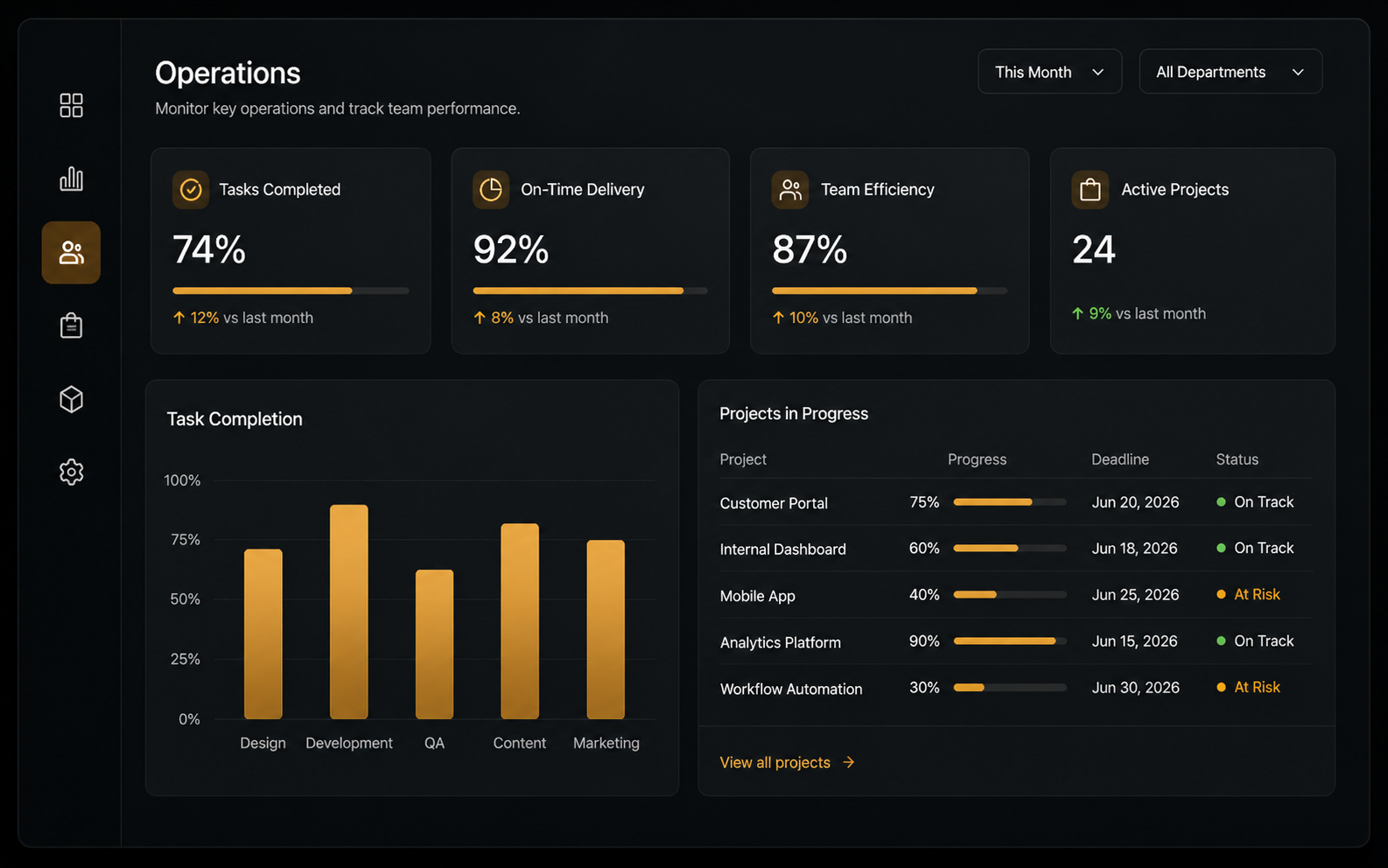
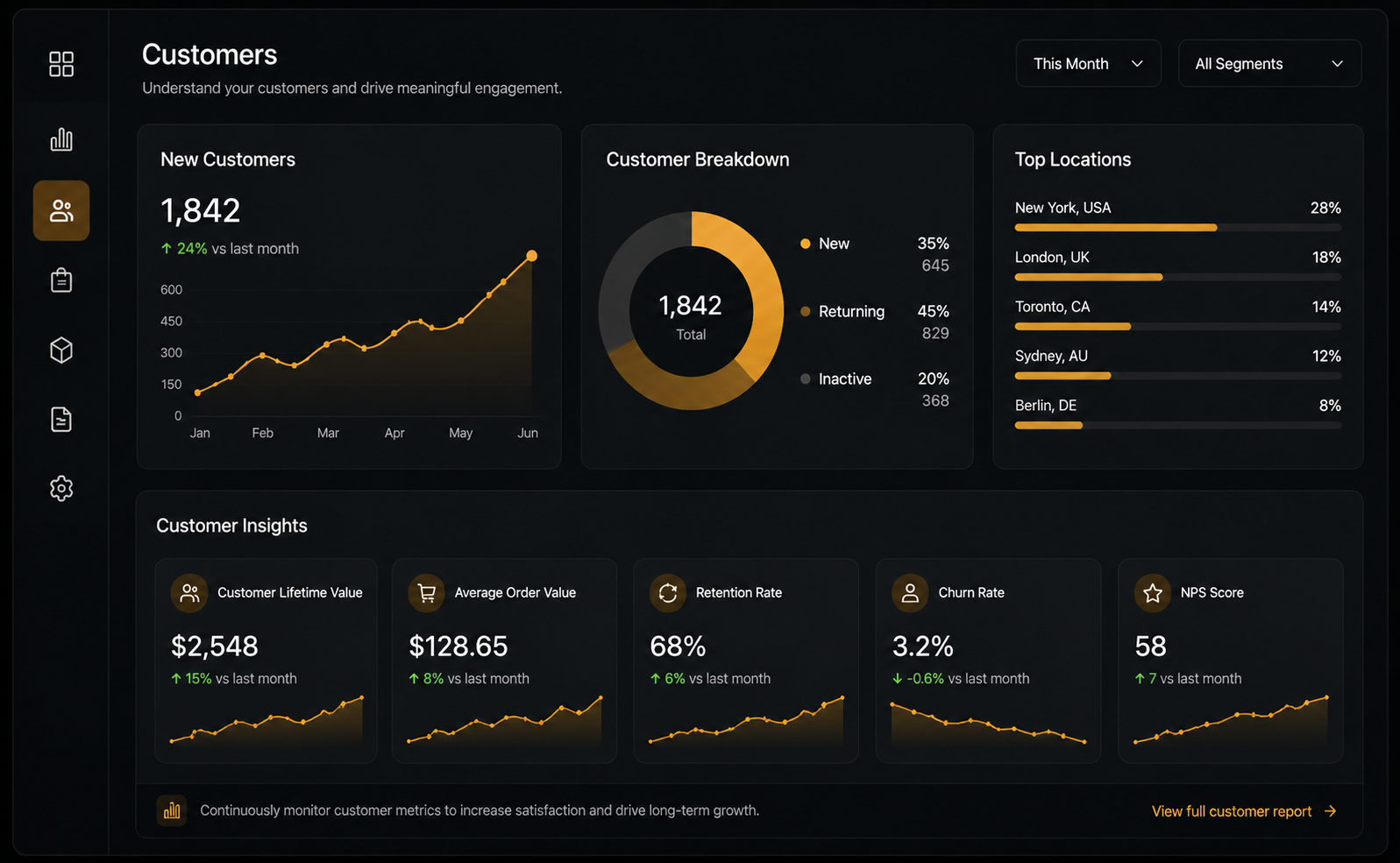
Looking Beneath The Surface
Scalability is often misunderstood as a technical challenge.
While infrastructure, databases, and performance are important, the larger challenge is operational scalability.
A scalable business system allows information to move efficiently between people, departments, and processes. It reduces unnecessary decisions, removes duplicated effort, and ensures teams can operate consistently as the organization grows.
This is why many modern businesses invest heavily in internal dashboards, operational platforms, workflow automation, customer management systems, and centralized reporting environments.
The goal is not simply digitization.
The goal is operational clarity.
Organizations that successfully scale understand that software should mirror how the business operates. Every workflow, permission level, approval process, notification system, and reporting structure should support real world behavior.
When software aligns with operations, growth becomes easier to manage. When software fights operations, growth creates friction.
Separate product demand from technical capacity
When software fails before it scales, teams often treat every symptom as an infrastructure problem. Begin by identifying whether the constraint is product clarity, workflow design, data quality, an external dependency, or actual compute capacity. Review user journeys and service measures together. A fast system that produces ambiguous decisions or inconsistent records is not ready to scale.
Create a baseline for request volume, response time, error rate, concurrency, queue age, data growth, and the availability of critical dependencies. Segment these measures by the workflows customers care about. Averages can hide severe problems for a specific region, account type, or operation, so define service objectives around meaningful user outcomes.
Build operational readiness into the architecture
Protect critical operations with validation, idempotency, bounded retries, timeouts, and clear failure states. Use asynchronous processing where users do not need an immediate result, but always expose status and a recovery path. Limit the impact of dependency failures with rate limits, circuit breakers, and safe degradation appropriate to the product.
Observability should connect logs, metrics, and traces to a transaction or customer journey without exposing sensitive information. Alerts need actionable thresholds, named owners, and response guides. Regularly test backups, restoration, access reviews, incident communication, and rollback procedures. Reliability is a product promise supported by operational practice.
Scale through controlled experiments
Use realistic load tests that reflect traffic shape, data size, cache behavior, and external services. Increase demand in stages, identify the first constraint, make one material change, and repeat the measurement. This is more trustworthy than a large redesign based on speculative peak numbers. Capacity plans should include safety margins and explicit assumptions that teams revisit as usage changes.
Release risky changes gradually with feature controls, representative pilot groups, and defined rollback criteria. After each stage, compare technical performance with adoption, completion, support demand, and business outcomes. Scaling succeeds when the system remains understandable to users and operable by the team. The goal is not simply to serve more requests; it is to preserve correct behavior, useful feedback, security, and recovery as demand grows.
Investigate the conditions under which software fails
Create a failure review that connects product behavior, technical signals, and operational context. When software fails, record the affected journey, user impact, input conditions, dependencies, duration, recovery action, and evidence. Avoid closing the review with a label such as “traffic spike” or “human error.” Ask which safeguard, limit, validation, or communication would have prevented the impact.
Look for repeated patterns across incidents. Software fails when assumptions about data, timing, permissions, or dependency behavior are left implicit. Convert each important assumption into a test, monitor, or documented operating decision. Prioritize controls according to impact and likelihood so the team does not add complexity everywhere.
Make recovery part of the product experience
Users need a clear status and next action when software fails. Preserve submitted information, prevent accidental duplication, explain whether work is queued or stopped, and provide a safe retry or support route. Internal teams need the same clarity through correlated records, ownership, and response guidance.
Practice recovery before demand increases. Run controlled scenarios in which software fails because a database is unavailable, an external service times out, a deployment introduces an error, or a permission rule changes. Measure detection, diagnosis, communication, restoration, and verification. Update runbooks from what actually happened in the exercise.
Turn failures into capacity evidence
Every time software fails, compare demand and performance with the documented capacity model. Confirm whether the limit was expected, whether alerts provided useful warning, and whether the response protected critical workflows. Update assumptions, thresholds, and forecasts with the new evidence.
The objective is not a system in which software fails nowhere; that promise is not credible. The objective is controlled resilience: failures are limited, visible, recoverable, and used to improve the next decision. Teams build trust when they explain what happened, correct the underlying condition, and verify that the fix works under realistic load.
Define scaling readiness in user terms
A scaling plan should begin with the outcomes that must remain dependable as demand increases. Identify the critical journeys, acceptable response time, correctness requirements, recovery expectations, and the impact of delay. This creates a practical definition of readiness. Software fails when teams optimize infrastructure without agreeing which behavior must be protected.
Set service objectives using real baselines and business priorities. Distinguish ordinary performance from peak behavior and define an error budget that guides tradeoffs between reliability work and change. Share these objectives with product and operations so technical limits are connected to customer commitments.
Protect data integrity under concurrency
Higher volume exposes race conditions, duplicated requests, stale reads, and inconsistent updates. Define transaction boundaries and invariants for important records. Use idempotency keys for repeatable commands, optimistic or explicit locking where appropriate, and reconciliation for asynchronous work. Software fails when retries create a second order, payment, message, or state transition.
Test migrations and backfills with production like volume. Measure lock time, replication delay, index behavior, and rollback. Preserve an audit trail for material transformations. A successful database change protects correctness and availability while giving operators a way to verify the result.
Use queues and caches with explicit guarantees
Queues can absorb demand and isolate dependencies, but they also introduce delay, duplication, ordering questions, and operational backlogs. Document delivery guarantees, retry limits, dead letter handling, and the user visible status. Monitor queue age as well as depth. Software fails when work remains technically accepted but never reaches a useful outcome.
Caches require similar discipline. Define what can be stale, for how long, and how invalidation occurs. Protect cache misses from overwhelming the source and test behavior during a cold start. Never cache authorization or sensitive responses without a clear security model.
Test realistic demand and failure combinations
Load testing should reproduce transaction mix, payload size, data distribution, user think time, cache state, background work, and dependency limits. Run soak tests long enough to reveal leaks and gradual backlogs. Increase demand in controlled stages and record the first constraint. Software fails when a synthetic headline number hides an unstable journey.
Combine load with failure injection. Delay a dependency, drop a portion of messages, restrict capacity, rotate credentials, and simulate partial regional disruption where relevant. Verify degradation, status communication, alerting, and recovery. The exercise is complete only when the team can explain what users experienced.
Release with bounded exposure
Use small batches, health checks, feature controls, canary traffic, and automatic rollback criteria for risky changes. Separate deployment from release when that improves control. Confirm database compatibility across versions and avoid a rollback plan that depends on reversing an irreversible migration. Software fails when a correct change reaches too much traffic before evidence is available.
Review releases using user outcomes and system signals together. A low technical error rate may still hide failed completion, confusing status, or increased support demand. Preserve the ability to pause and investigate without forcing the organization into a full emergency response.
Design incident response as a team capability
Define severity using customer and business impact, not only technical symptoms. Establish who leads response, investigates, communicates, and approves recovery actions. Maintain current contacts and practice handoffs. When software fails, stakeholders need accurate updates with the impact, current action, next checkpoint, and safe advice.
After recovery, run a blameless review focused on conditions and safeguards. Record the timeline, contributing factors, detection gaps, effective responses, and corrective actions with owners and dates. Verify completion and effectiveness. A long list of weak actions creates less safety than a small number of tested controls.
Control dependencies and supply chain risk
Inventory critical libraries, platforms, APIs, infrastructure services, and vendors. Record ownership, version, support status, data access, limits, alternatives, and response contacts. Monitor security advisories and expiry. Software fails when an unmanaged dependency changes or becomes unavailable outside the team’s assumptions.
Use dependency timeouts, isolation, rate limits, and appropriate fallback. Test the behavior promised by contracts rather than relying on marketing availability. For critical vendors, document data export, substitution, and exit procedures before switching becomes urgent.
Connect cost to reliability and growth
Measure cost by environment, capability, and meaningful workload. Review idle resources, storage growth, data transfer, observability volume, and expensive request patterns. Optimize after establishing a reliable baseline. Software fails when emergency cost controls remove the capacity or evidence needed to operate safely.
Create forecasts with demand ranges and explicit unit assumptions. Identify lead times for capacity, vendor limits, and architectural changes. Compare forecasts with actual usage regularly. This keeps scaling investment proportionate while reducing the risk of discovering a constraint through customer impact.
Maintain a scaling readiness review
Before a major launch or growth campaign, review capacity, service objectives, data integrity, dependency limits, security, observability, support coverage, incident roles, rollback, and customer communication. Record evidence and unresolved risk. Software fails when readiness is treated as one team’s private confidence rather than a shared operating decision.
Repeat the review after the event. Compare predictions with demand and outcomes, update models, and retire temporary controls that are no longer needed. Scaling becomes sustainable when the organization learns from every increase in volume and keeps the system understandable to the people responsible for it.
Preserve human and organizational capacity
Scaling also increases coordination load. Document ownership, on call expectations, escalation, and the time required for maintenance. Rotate knowledge, review access, and automate repetitive operational checks. Software fails when demand depends on a few people who cannot rest, transfer context, or improve the system.
Track support volume, alert load, interrupted work, and time spent on manual recovery. Include these measures in product and capacity planning. Sustainable scale protects the people operating the service as carefully as the infrastructure, because reliable judgment is part of the system.
The software that scales best is rarely the one with the most features. It is the one designed around how the business actually works.
A Structured Way To Think
Analyze
Understand how teams, data, and processes interact across the organization.
Structure
Build workflows that support operational behavior rather than isolated tasks.
Centralize
Create a single source of truth for information and reporting.
Optimize
Continuously refine systems as business complexity increases.
Building Software That Lasts
Design systems around workflows before designing interfaces.
Centralize critical business information whenever possible.
Reduce manual data transfer between departments.
Plan software architecture for future operational complexity.
Focus on operational clarity rather than feature quantity.
Treat software as business infrastructure rather than a collection of tools.
Ready to build better systems?
Whether you need an internal dashboard, operational platform, CRM system, or custom business software, we design solutions built around real workflows, long term scalability, and measurable business impact.